Track Your Lifts.
Hit New PRs.
Zero BS.
The workout tracker for lifters who write their own program. Build your plans, log sets in seconds, and watch your progress on iPhone and iPad.
- Free to start
- No account
- iPhone & iPad


Everything You Need. Nothing You Don't.
No feed, no coach in your ear, no sign-up. Just the tools to plan, lift and progress.
Plans Built Your Way
Set sets, fixed reps, rep ranges or AMRAP for every exercise. Add timed holds, RPE targets, and swappable exercise variants for when the rack is taken.
Log Sets in Seconds
Your load is pre-filled from last session. Tap to log reps, then mark Next Load as increase, maintain or decrease, and GymForge sets you up for next time.
Rest & Hold Timers
A set timer for planks and dead hangs, with haptics when you hit the target. A colour-coded rest timer tells you when you are ready for the next set.
Live on Your Lock Screen
A Live Activity shows your workout on the Lock Screen and in the Dynamic Island: elapsed time, set progress, the current exercise and your active hold.
Insights That Matter
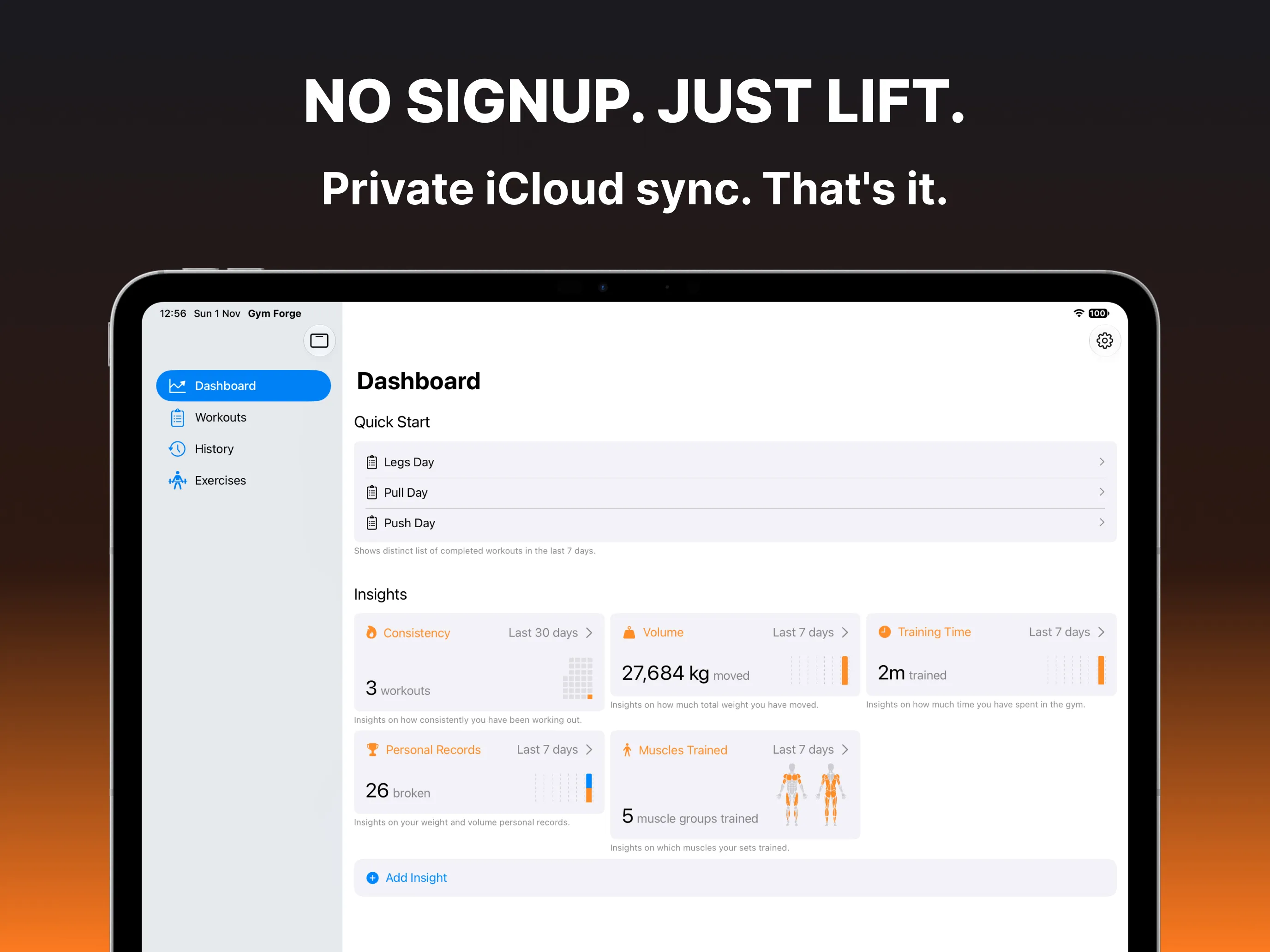
Consistency, volume, training time, personal records and a muscle heatmap of what you trained. Choose your cards and view any week, month or year.
Celebrate Every PR
Weight, volume, reps and longest-hold records are tracked for every exercise. Your workout summary shows each new PR next to your previous best.
And all the details lifters care about
- Muscle map with primary and secondary muscles, auto-suggested for common exercises
- YouTube form videos per exercise, trimmed to the part you need
- Plate calculator for your barbell and the plates your gym has
- Equipment library with Olympic, EZ, trap and specialty bars
- Pause and resume any workout without losing a second
- Recovers your workout if the app is closed mid-session
- Apple Health sync with active calories
- Edit past workouts and browse full exercise history
- CSV export of every set for your own analysis
- Archive exercises without losing their history
- Kilograms or pounds
- Screen stays awake while you train
Now at home on iPad.
Plan your week on the big screen, then train with your iPhone. GymForge on iPad is fully native and syncs with your iPhone through iCloud.
- Sidebar navigation
- Plans and exercises side by side
- A wider Insights grid
- Every orientation, Split View and Stage Manager
Private by Design
No sign-up, no ads, no tracking. Your workouts live on your device and in your own private iCloud, so they follow you between iPhone and iPad and nowhere else. GymForge works fully offline, too.
Free to Lift. Pro to Go Further.
The free version is a complete workout tracker. GymForge Pro adds the tools for dialled-in training.
| Feature | Free | Pro |
|---|---|---|
| Workout logging, history & editing | Included | Included |
| Timed holds with Set Timer | Included | Included |
| Live Activity & Dynamic Island | Included | Included |
| Personal record tracking | Included | Included |
| Muscle map & form videos | Included | Included |
| iCloud sync & Apple Health | Included | Included |
| Consistency insight | Included | Included |
| Workout plans | Up to 3 | Unlimited |
| Rest timer | Not included | Included |
| RPE targets | Not included | Included |
| Custom weight increments | Not included | Included |
| Plate calculator | Not included | Included |
| Exercise variants | Not included | Included |
| Volume, Training Time, PR & Muscles Trained insights | Not included | Included |
| CSV export | Not included | Included |
GymForge Pro is available monthly or yearly as an in-app subscription. See the App Store for current pricing in your region.
“GymForge is easily one of the best fitness apps I've used. The workout plans are well-structured, and the ability to customize routines based on my goals is a huge plus. I especially like the tracking features and progress visualization — it keeps me motivated! The interface is clean, intuitive, and fast.”
Rated 5.0 on the App Store
Ready to lift?

Free on iPhone & iPad — No account required
Frequently Asked Questions
Is GymForge free?
Yes. GymForge is free to download with no ads, and the free version covers building plans, logging workouts, timed holds, PR tracking and the Live Activity. GymForge Pro unlocks the advanced tools, such as the rest timer, RPE targets, the plate calculator and all insights, with a monthly or yearly subscription.
Does it work on iPhone and iPad?
Both. On iPad, GymForge uses a sidebar, shows your plans and exercises side by side, and lays Insights out in a wider grid. It supports every orientation, Split View and Stage Manager. Your data syncs between devices through iCloud. GymForge requires iOS or iPadOS 26.
Do I need an account?
No. There is no sign-up and no login. Your data lives on your device and in your own private iCloud, and your GymForge Pro subscription is handled by the App Store.
Who is GymForge for?
Lifters who design their own training. Whether you run progressive overload, rep ranges, AMRAP sets, RPE or timed holds, GymForge adapts to your plan instead of handing you one.
Can I use the app offline?
Yes. GymForge works fully offline, and your data syncs through iCloud when you are back online. Only exercise form videos need a connection.
Can I get my data out?
Your workouts are backed up automatically to your iCloud. With GymForge Pro you can also export every set to a CSV file, for all workouts or a date range.
Does GymForge work with Apple Health?
Yes. Turn on Sync Workouts and GymForge records each session as a strength-training workout in Apple Health, including duration and active calories.
Ready to Transform Your Training?
Start logging your workouts today on iPhone and iPad. It's free, with no account required.

Free — No account required
Interested in GymForge for Android?
We're working hard on bringing GymForge to Android. Register your interest below to be notified when it launches!
Thanks! We'll notify you when GymForge launches on Android.